Yoast and Rank Math Still Output FAQ Schema In 2026: Here Is What It Now Does

Both major WordPress SEO plugins still ship with FAQ schema enabled by default. They have not changed that default since Google retired FAQ rich results in 2023. If your WordPress site is using Yoast or Rank Math out of the box, you are still emitting FAQ markup that no longer earns the SERP feature it was designed for. The schema is not broken. The advice that pointed you at it is.
What changed and when
Google announced the change in August 2023. Search Engine Land covered the rollout. FAQ rich results (the question dropdowns under blue links) disappeared from standard SERPs for everyone except authoritative government and medical institution sites. Two and a half years later, WordPress’s major SEO plugins have not caught up. Yoast SEO, Rank Math, AIOSEO, SEOPress all still output FAQPage schema when a Gutenberg FAQ block is on a page. None of them surface a warning that the SERP outcome it was meant to produce is no longer available to commercial WordPress sites.
The result: a meaningful chunk of WordPress SEO advice still on page one in 2026 is technically correct (“Yoast adds FAQ schema for you”) and outcome-wrong (“which makes your pages eligible for rich results in Google search”). It does not.
Why this is a WordPress-specific problem
In our experience auditing WordPress business sites, three things compound here:
1. WordPress users trust the green lights. Yoast’s analysis turns green when FAQ schema validates. The plugin gives no signal that validation no longer means visibility. Most non-technical owners read green-light = “Google likes this.” We covered this pattern in why Yoast green lights do not mean rankings. FAQ schema is the cleanest current example.
2. The plugins do not differentiate between schema that earns SERP features and schema that does not. A clean dashboard shows “FAQ schema: enabled” the same way it shows “Article schema: enabled.” Article schema still earns rich result eligibility. FAQ schema no longer does. The plugin treats them as equivalent green checkmarks.
3. Other schema types Yoast and Rank Math output go ignored. Both plugins can output Organization schema, BreadcrumbList schema, Article schema, and Product schema (with WooCommerce). Most WordPress users we audit have FAQ schema configured and one of those four missing or misconfigured. The active levers go un-pulled while the inactive lever stays polished.
What to do in your WordPress dashboard this week
Three things, in order, none requiring a developer.
1. Audit what your plugin is actually outputting
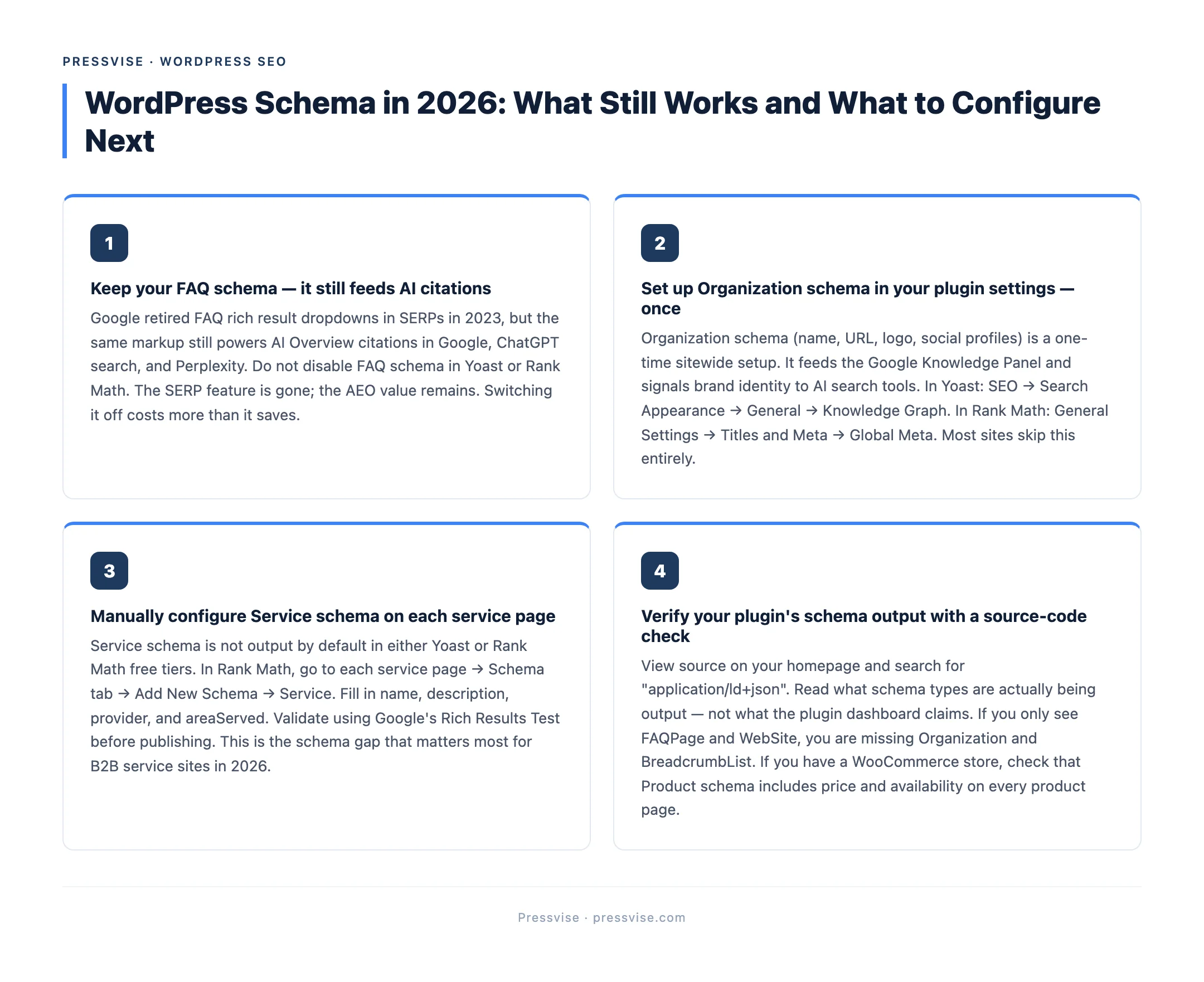
Open a service page or pricing page. View source. Search for application/ld+json. Read what schema types are present. If you see only FAQPage and WebSite, that is the symptom. If you see Organization, BreadcrumbList, Article or Service, you have more to work with than you realised.
Both Yoast and Rank Math output Organization and BreadcrumbList schema by default in their Pro versions, but the configuration is buried. The free versions emit a partial subset. Most WordPress sites we look at are running the free plugin and missing 60% of the schema they could be emitting.
2. Configure Service schema on your service pages
Service schema is the WordPress-specific schema gap that matters most for local and B2B WordPress sites. It is the SERP feature that replaced what FAQ rich results used to do: pricing snippets, service-area enhancements, and AI source attribution.
In Yoast Premium, this lives under the page-level schema settings as a Service block. In Rank Math, it is under the page’s “Schema” tab. In neither plugin is it configured by default. The walkthrough is short, but specific to each plugin, and getting it wrong (wrong provider, missing areaServed) means it does not validate.
| Schema type | Default in free Yoast / Rank Math? | Earns rich results in 2026? | WordPress configuration |
|---|---|---|---|
| FAQPage | Yes (with FAQ block) | No (commercial sites) | Keep, do not invest more |
| Article / BlogPosting | Yes | Yes | Default behaviour usually fine |
| Organization | Pro only | Yes (Knowledge Panel) | One-time sitewide setup in plugin settings |
| Service | Pro, manual per page | Yes (pricing + service-area) | Per-page setup, validate at Google Rich Results Test |
| BreadcrumbList | Yes | Yes | Default |
| Product (WooCommerce) | Yes | Yes (price, rating) | Verify on every product page |
3. Stop reading WordPress SEO advice that hasn’t been updated since 2023
The biggest available win for a WordPress site owner reading this is to discount any SEO blog post that still describes FAQ schema as a path to rich results. The advice is dated. Many of the popular WordPress SEO blogs republish the same FAQ-schema tutorials annually with the year in the title and no substantive update. We covered the broader pattern in what to actually check in a WordPress SEO audit. Schema misconfiguration is in the top three issues we find.
If your WordPress site relies on plugin defaults for schema strategy, the FAQ retirement is one of several things the plugins did not flag. A proper schema audit will surface the rest. Read the Pressvise WordPress SEO pillar guide for the full architecture.
If you want this audit done for you, it is the first thing we ship in week one of every Pressvise engagement: three pages, full schema map, plugin-specific reconfiguration steps.
FAQ
Should I disable FAQ schema in Yoast or Rank Math? Yoast and Rank Math handle FAQ schema for you by default, and overriding that default would actively damage what is already in place. The SERP benefit is gone, but the same markup still feeds AI Overview citations, ChatGPT search, and Perplexity. Switching it off costs you AEO citation eligibility on question-answer content you already published, and gains you nothing.
Does my WordPress site qualify for the FAQ rich result exception? Almost certainly not. The exception is limited to authoritative government sites and medical institution sites (think NHS, Mayo Clinic, .gov agencies). A commercial WordPress site, even in healthcare or government adjacent sectors, will not qualify on domain authority alone.
Which WordPress SEO plugin handles schema better, Yoast or Rank Math? For free-tier users, Rank Math outputs slightly more schema types by default. For Pro users, Yoast’s per-page schema customization is more granular. Neither plugin will configure Service schema for you correctly. That is manual work either way. We compared both in Yoast vs Rank Math for WordPress SEO.