Why Your Yoast Green Lights Don't Mean Rankings

Yoast SEO not ranking your site has nothing to do with a missing green light. The plugin checks formatting, not the factors Google actually uses to decide who shows up on page one. If every indicator is green and your traffic is flat, the problem sits in layers Yoast was never designed to reach.
This is one of the most common frustrations we see from WordPress site owners. You followed the checklist. You filled in the focus keyphrase. You got the smiley face. And nothing happened.
Here is why, and what to look at instead.
What Yoast’s green lights actually check
Yoast runs a series of on-page formatting checks against the content you have written. That is all it does.
Specifically, it looks at:
- Keyword density — whether your focus keyphrase appears often enough in the text, headings, URL, and meta description.
- Meta description length — whether your snippet fits within the character limit Google displays.
- Readability score — sentence length, passive voice, paragraph structure. Based on the Flesch reading ease formula.
- Internal and outbound links — whether you included at least one of each.
- Image alt text — whether images have alt attributes containing the keyphrase.
These are real on-page hygiene items. They matter. But they are formatting checks, not ranking signals. Google does not award positions because your keyword density hit 1.2%. It awards positions based on relevance, authority, technical performance, and user experience across the entire domain.
Yoast’s own documentation is transparent about this. The plugin helps you write content that is well-structured for search engines. It does not promise rankings. The green light means “this page is formatted correctly.” It does not mean “this page will rank.”
What Yoast can’t see
The gap between a well-formatted page and a ranking page is where most WordPress sites get stuck. Yoast operates at the content layer. It cannot access or diagnose the three areas that most commonly block rankings on WordPress.
Core Web Vitals in the theme layer. Your WordPress theme controls how the page loads, how layout shifts occur, and how quickly the largest visible element renders. These are measured as LCP (Largest Contentful Paint — how fast the main content appears), CLS (Cumulative Layout Shift — how much the page jumps during load), and INP (Interaction to Next Paint — how responsive the page feels). A bloated theme with render-blocking CSS and unoptimized JavaScript will fail these metrics. Yoast has no visibility into your theme’s code.
Plugin conflicts that break crawling. WordPress sites average 20-30 active plugins. Caching plugins that serve stale sitemaps. Multiple SEO plugins overwriting each other’s meta tags. Redirect plugins creating loops that trap Googlebot. Security plugins blocking crawl bots entirely. In our experience auditing WordPress sites, plugin conflicts are the single most underdiagnosed cause of indexing failures. Yoast cannot detect them because it only sees its own output.
URL and category architecture fragmenting authority. WordPress generates URLs from categories, tags, date archives, author archives, and pagination. Without deliberate architecture, a 50-page site can produce 200+ indexable URLs, most of them thin or duplicate. This fragments the domain authority (a measure of your site’s overall credibility in Google’s system) across pages that compete with each other instead of reinforcing a single topic cluster. Yoast lets you set canonical URLs on individual pages, but it cannot restructure your entire site’s URL taxonomy.
The gap between on-page optimization and ranking
Think of WordPress SEO in four layers:
- On-page content — keywords, headings, meta descriptions, readability. This is the Yoast layer.
- Technical foundation — Core Web Vitals, crawlability, indexation, site speed, mobile rendering. This is the theme and server layer.
- Content authority — depth of coverage across a topic, internal linking architecture, content freshness. This is the content strategy layer.
- Backlinks and domain authority — external sites linking to yours, building credibility signals over time.
Yoast handles layer one. Competently. But if layers two through four are broken or absent, perfect on-page optimization still produces zero rankings.
What we consistently find is that WordPress site owners invest heavily in layer one because it is the most visible and the easiest to act on. The plugin gives instant feedback. Green feels like progress. But the work that actually moves rankings happens in layers two and three, and those require tools and expertise Yoast was never built to provide.
A site with mediocre on-page optimization but a fast, clean technical foundation and strong internal linking will outrank a site with perfect Yoast scores but a slow theme and no content strategy. Every time.
When to keep Yoast vs. when to get help
Yoast is a useful tool. There is no reason to uninstall it. It catches basic formatting errors, manages your XML sitemap, and provides a structured way to write meta descriptions. For a solo founder publishing their first few blog posts, it is a reasonable starting point.
But Yoast becomes a false signal when it is your only feedback mechanism for SEO.
Here are the signs that your ranking problem is structural, not on-page:
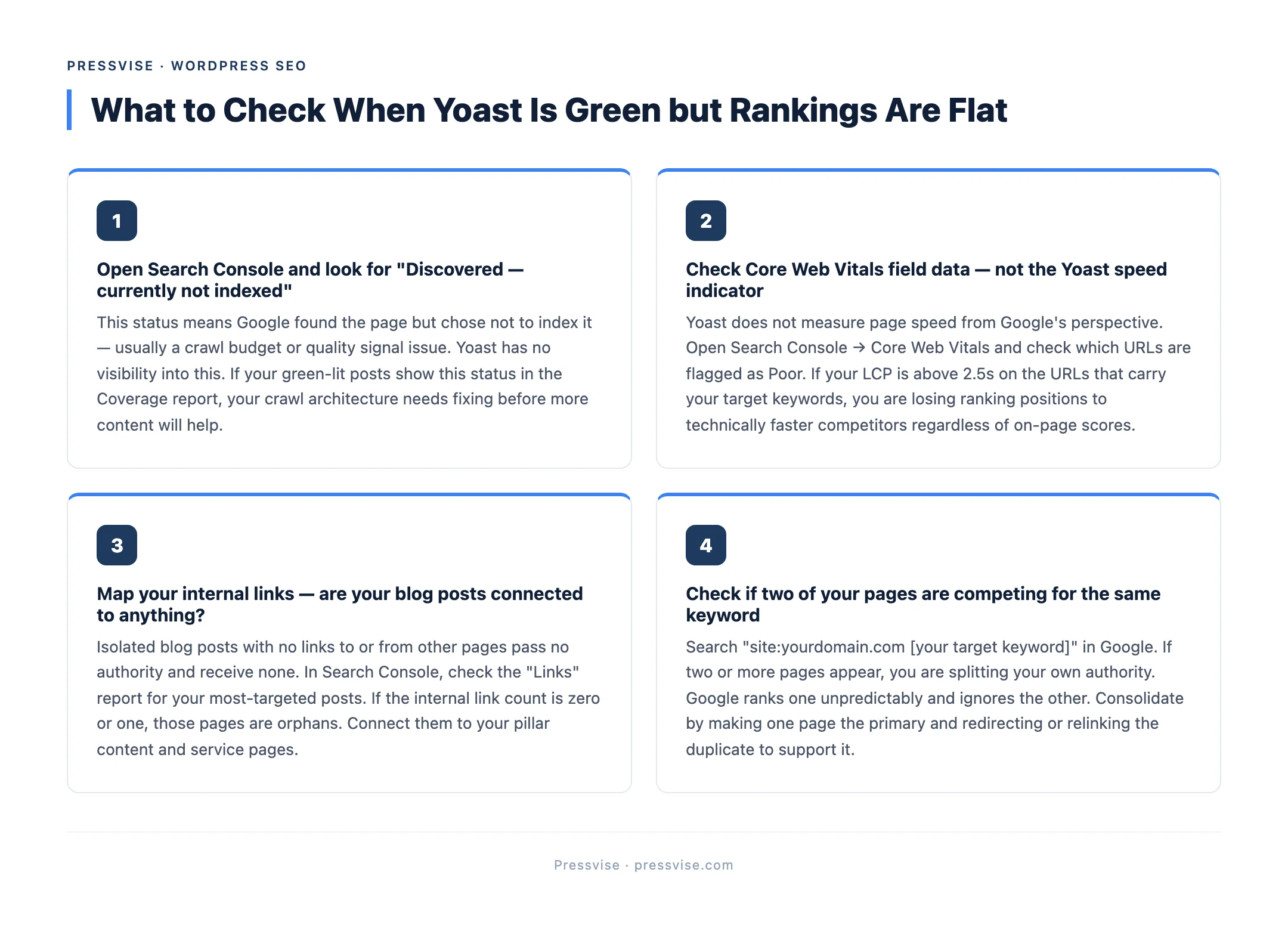
- Six months of green lights, no ranking movement. If every post scores well in Yoast and none of them appear in the top 50 results, the issue is not content formatting.
- Google Search Console shows crawl errors or indexing issues. Pages stuck in “Discovered - currently not indexed” or “Crawled - currently not indexed” point to technical problems.
- Core Web Vitals failing in PageSpeed Insights. If your LCP is above 2.5 seconds or CLS above 0.1, your theme is costing you rankings regardless of what Yoast says.
- No internal linking strategy. If your blog posts are isolated pages with no links between them and no connection to pillar content like our complete guide to WordPress SEO, you have no content authority.
- Competing with your own pages. If multiple URLs target the same keyword, you are splitting your own authority. This is a Core Web Vitals and architecture problem hidden in your theme layer, not a Yoast problem.
When these patterns appear, the fix requires WordPress-specific technical SEO work — auditing the theme, cleaning plugin conflicts, restructuring URLs, and building a content architecture that compounds authority over time.
If that sounds like where your site is right now, we are a WordPress SEO agency that fixes what Yoast can’t.
FAQ
Is Yoast SEO enough to rank on Google?
No. Yoast handles on-page formatting — keyword placement, meta descriptions, readability. These are necessary but not sufficient. Ranking requires a fast technical foundation, authoritative content, strong internal linking, and backlinks. Yoast addresses roughly 25% of what Google evaluates.
Why does Yoast show green but my site doesn’t rank?
Because Yoast’s analysis is limited to on-page content signals. It cannot detect slow page load times caused by your theme, plugin conflicts that prevent Google from crawling pages, or a weak domain authority that makes your content invisible against established competitors. Green lights confirm formatting. They do not confirm competitiveness.
Should I switch from Yoast to Rank Math?
Switching SEO plugins rarely fixes ranking problems. Rank Math and Yoast perform similar on-page checks. If you are not ranking with Yoast, you will not rank with Rank Math either, because the issue is almost certainly not at the plugin level. Focus on your technical foundation and content strategy before changing tools.